SSH shell access provides you remote connection to your webhost server's command shell where you can type in Linux commands. SSH access is also required is you want to use secure SFTP over SSH.
In order to grant you SSH shell access, some webhosts require that you make a formal request with a photo identification. The reason is that SSH is for advanced users and providing shell access grants the user a bit more power to configure and do things on the server than otherwise. Understandably, webhost do not want hackers to gain SSH access.
To connect via SSH, you need a SSH client such as Putty as shown...
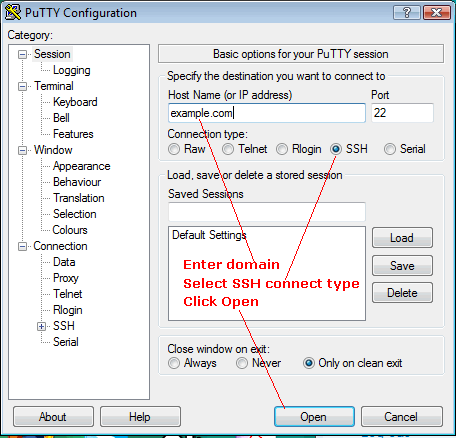
Once connected, a command window shell should come up with a prompt asking for your login and password. Once authenticated, you can type in Linux commands (such as "ls", "pwd", and so on) in the command window shell. Type "exit" or "logout" to exit.
More Info
Configuring Putty
Secured Linux access with Putty