|
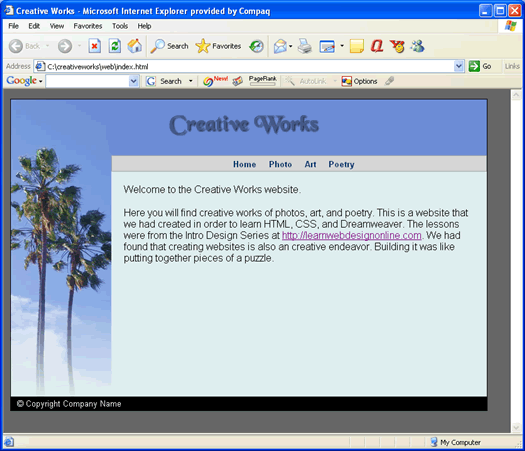
Centering Page ContentWhat we have currently is a website that is fixed to the left side of the browser window. View Live Code from Last Lesson
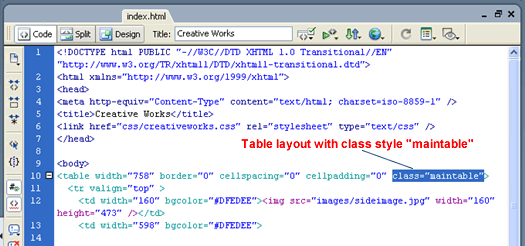
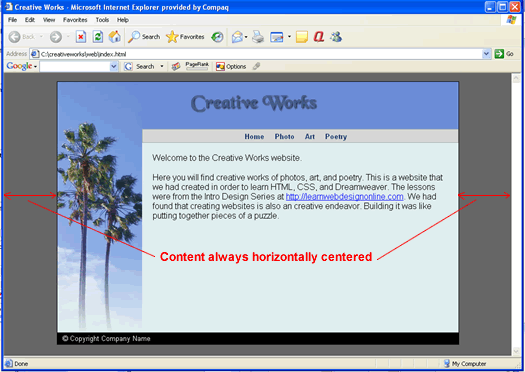
We will now alter the CSS rules such that the pages are always horizontally centered regardless of how the user resizes the browser. See What Class Controls Our Main TableIf you open up the code view of index.html, you will see that our main layout table is controlled by class style called maintable.
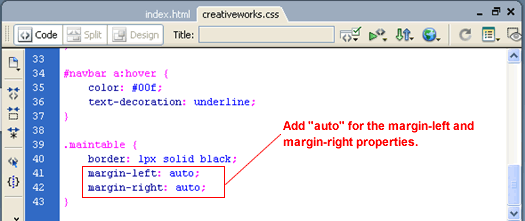
We want to alter the CSS style rule for this class. So we open up creativeworks.css and change that rule to ...
By adding the value auto to the margin-left and margin-right properties for that table. The browser will automatically adjust the left and right margins of the table so the table is horizontally centered. Note that for this technique to work, the table tag must have a fixed width. Looking at the above code, we see that indeed that table has a width="758" attribute.
Test this out in both Internet Explorer and Firefox and you see that it works. In addition, it works for the photo.html, art.html, and poetry.html pages as well since these pages also references the same .maintable CSS rule. View Live Code ConclusionThis concludes the Intro Web Design Series. Hope you have enjoyed the lessons.
|
 |
 |
| Roadmap | Lessons | Tutorials | Videos | Books | Links | About |
|
|